Best App Store
Screenshot Generator.
AppLaunchFlow combines AI draft speed with full visual control, so your iOS screenshots look premium and launch-ready in minutes.
1,400+
app developers
40,000+
screenshots generated
Visual Editor
Build polished iOS screenshots without slowing your release cycle.
AppLaunchFlow gives growth, product, and founder teams a practical workflow: AI-assisted drafts for speed and full editing control for launch-ready quality.
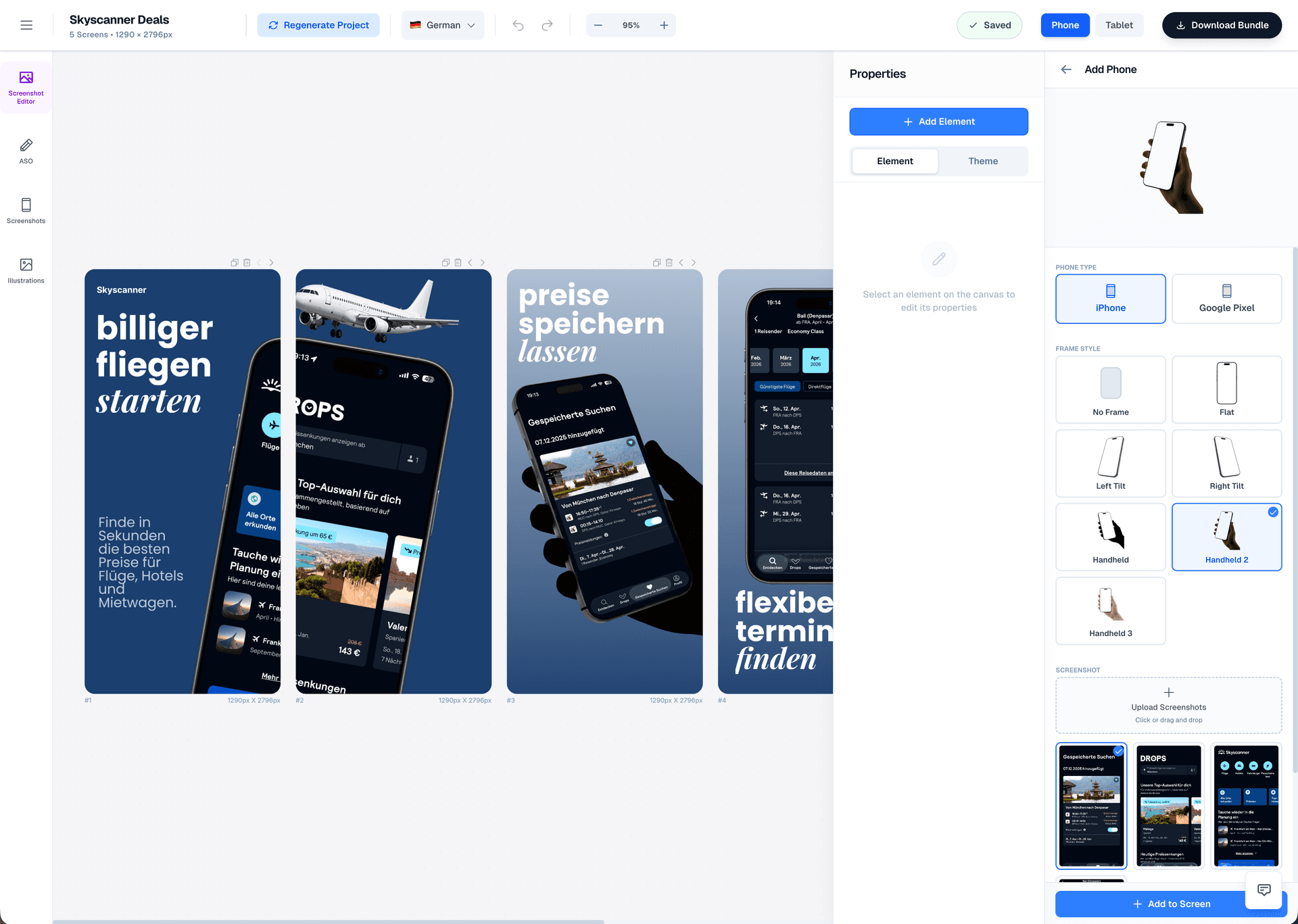
Drag & Drop Control
Intuitive interface with zoom controls and precise positioning for pills, badges, and text.
3D Device Frames
Showcase your app in iPhone, Pixel, or iPad frames and keep every slide visually consistent.
Smart Assets
Use pills, badges, ratings, and curated visual assets without external design tools.
Features
What teams evaluate in the best app store screenshot generator
These are the capabilities most teams prioritize when they need consistent App Store screenshot quality at launch speed.
Evaluation Framework
How teams assess the best app store screenshot generator
The best choice depends on your workflow. For launch-focused iOS teams, these criteria usually matter most when comparing screenshot tools.
How quickly can your team get from raw screenshots to a usable first concept?
AppLaunchFlow uses AI-assisted structure and copy suggestions so teams start with an editable draft instead of a blank canvas.
Can you still polish typography, spacing, and hierarchy for a premium final result?
You can refine every element in the visual editor, keeping brand voice and layout quality under your control.
Does the workflow support practical App Store sizing requirements without manual rework?
The workflow is built for iOS screenshot production and export consistency across common App Store device targets.
How fast can you adapt screenshot messaging for multiple markets?
Localization support helps teams translate captions and keep layouts readable across language expansion.
Can you update screenshots every release without rebuilding from scratch?
Reusable template systems and quick editing cycles make refreshes practical for ongoing iOS roadmap updates.
Comparison
How AppLaunchFlow performs on practical buying criteria
When teams evaluate screenshot tools, they usually compare speed, design control, localization readiness, and how easy it is to keep assets current after each release. AppLaunchFlow is built for that day-to-day production reality.
| Criteria | Manual tools | AI-only tools | AppLaunchFlow |
|---|---|---|---|
| First draft speed | Slow manual setup | Fast, often generic | Fast AI draft with editable structure |
| Design quality control | High, but time-intensive | Low control | High control with faster production |
| Consistency across iPhone sizes | Manual resizing | Inconsistent adaptation | Layout rules that stay consistent by size |
| Release-to-release updates | Frequent rework | Hard to iterate cleanly | Reusable systems for rapid refreshes |
The Challenge
Best app store screenshot generator: what separates great tools from average ones?
Most screenshot tools force a tradeoff. Manual design tools offer control but are slow, while one-click generators are fast but generic. Teams often end up with screenshots that are either polished but delayed, or fast but weak at conversion.
The best app store screenshot generator should remove that tradeoff. AppLaunchFlow generates strong first drafts, but keeps every layer editable so you can adjust hierarchy, copy, colors, and spacing before export.
Because App Store visuals must stay clear across multiple iPhone sizes, the system also keeps layouts consistent from one format to another. That helps your listing feel intentional, trustworthy, and easier for users to scan.
Deep Dive
How to choose the best app store screenshot generator
Prioritize tools that support both speed and refinement. The strongest workflow gives your team quick first drafts, then enough control to align visuals with your product positioning and brand voice.
You should also evaluate repeatability. A great screenshot generator is not just for one launch; it should make future updates, localization work, and seasonal refreshes faster each time.
Learn More
Guides for screenshot strategy and ASO execution
2026-01-10
How to design app store screenshots that drive downloads. Proven strategies for screenshot layout, captions, device frames, and ASO screenshot best practices for iOS and Android.
Read more
2026-02-03
Create professional app store screenshots without hiring a designer. Step-by-step guide using AI screenshot generators, templates, and no-code tools for iOS and Android.
Read more
2026-01-16
The complete ASO guide for 2026 with data-backed strategies. Learn app store optimization best practices: keyword research, screenshot psychology, icon design, and conversion optimization for iOS and Android.
Read more
Last updated: March 5, 2026
Facts
How It Works
Create App Store screenshots in three steps
Get started in minutes with our simple workflow
Upload your app visuals
Import your iPhone screenshots and product context so the system can propose clear visual storytelling.
Generate and refine
Use AI-generated drafts as a starting point, then edit copy, hierarchy, and layout details until everything feels launch-ready.
Export and publish
Download iOS-ready screenshot assets and upload directly to App Store Connect.
Related
Related resources
Frequently asked questions.
Everything you need to know about best app store screenshot generator
Sources
Citations & references
Apple App Store Product Page guidelines
Apple guidance on product page screenshots and visual storytelling.
View sourceGoogle Play screenshot guidelines
Play Store requirements used for cross-platform screenshot planning.
View sourceStoreMaven screenshot optimization research
Research showing screenshot quality influences conversion behavior.
View sourceBuild a repeatable App Store screenshot workflow for your next launch
Use AppLaunchFlow to create professional App Store screenshots faster without giving up design quality. Build a system once, then reuse it for every release.
That repeatable workflow helps your listing stay fresh, accurate, and conversion-focused as your app evolves.
No credit card required